AI-Agents-Orchestrator
Features Documentation
Table of Contents
- Core Features
- CLI Features
- Web UI Features
- Conversation Mode
- Workflow System
- AI Agent Integration
- Session Management
- File Management
- Security Features
- Monitoring & Metrics
- Advanced Features
Core Features
Multi-Agent Collaboration
The orchestrator coordinates multiple AI coding assistants to work together on complex tasks.
graph LR
    A[Task] --> B[Codex<br/>Implementation]
    B --> C[Gemini<br/>Review]
    C --> D[Claude<br/>Refinement]
    D --> E[Quality Code]
Benefits:
- Diverse Perspectives: Each AI has unique strengths
- Quality Assurance: Multiple review cycles
- Best Practices: Automated code review
- Efficiency: Parallel execution where possible
Supported AI Agents:
- Claude Code (Anthropic) - Refinement and documentation
- OpenAI Codex - Code implementation
- Google Gemini - Code review and analysis
- GitHub Copilot - Suggestions and alternatives
Configurable Workflows
Define how agents collaborate for different scenarios.
| Workflow | Agents | Iterations | Use Case |
|---|---|---|---|
| default | Codex → Gemini → Claude | 3 | Production code with quality assurance |
| quick | Codex only | 1 | Fast prototyping |
| thorough | Codex → Copilot → Gemini → Claude → Gemini | 5 | Mission-critical code |
| review-only | Gemini → Claude | 2 | Existing code improvement |
| document | Claude → Gemini | 2 | Documentation generation |
Custom Workflows:
workflows:
  custom:
    max_iterations: 4
    min_suggestions_threshold: 5
    steps:
      - agent: "codex"
        task: "implement"
      - agent: "gemini"
        task: "security_review"
      - agent: "claude"
        task: "refine"
CLI Features
Interactive Shell
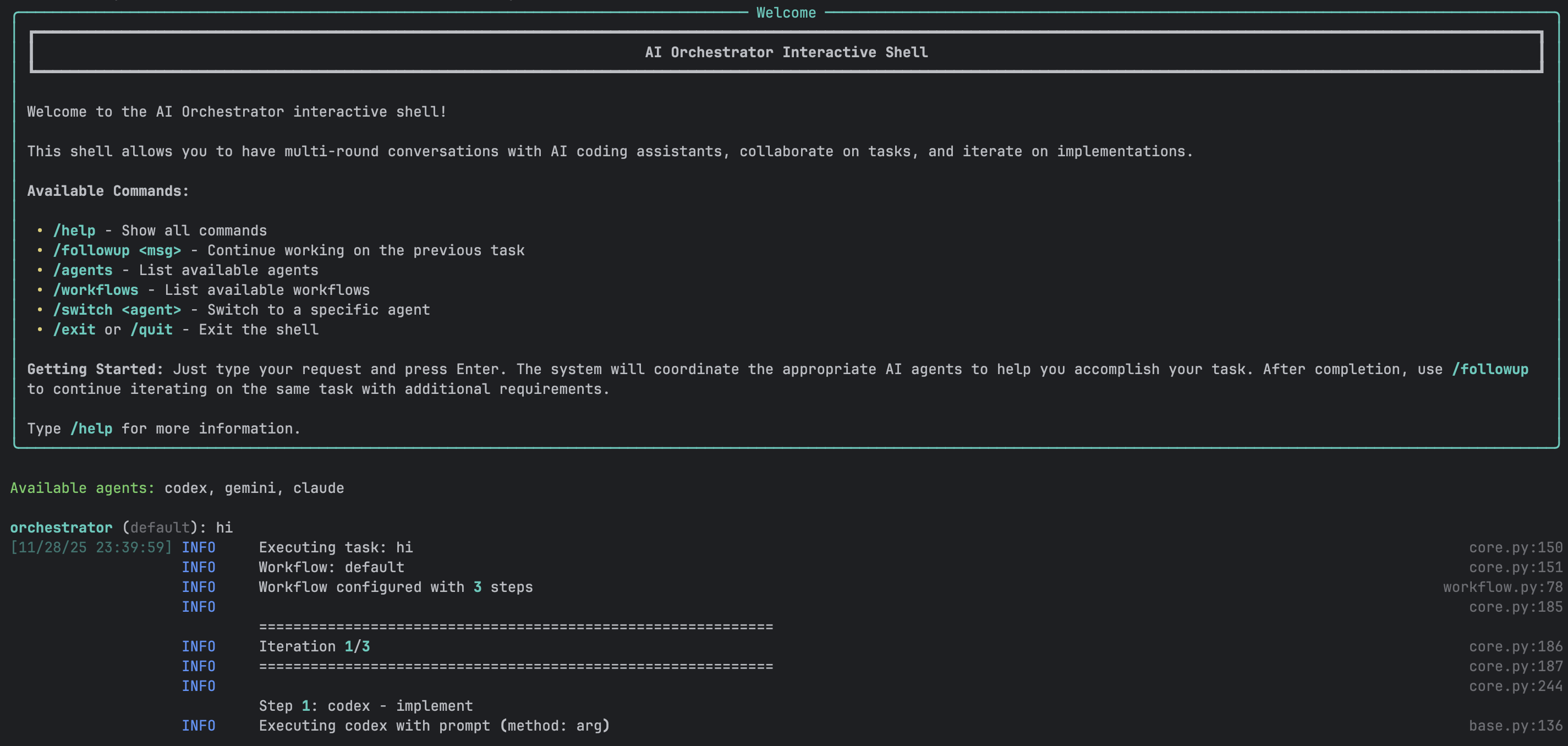
A powerful REPL-style interface for natural conversations with AI agents.
Features:
- ✅ Multi-round conversations with context preservation
- ✅ Smart follow-up detection
- ✅ Full readline support (arrow keys, history, tab completion)
- ✅ Session save/load
- ✅ Real-time progress indicators
- ✅ Colored output with Rich library
- ✅ Command history across sessions
- ✅ Auto-completion for commands and workflows
Example Session:
$ ./ai-orchestrator shell

orchestrator (default) > create a REST API for blog posts

✓ Task completed successfully!
📁 Generated Files:
  📄 api/blog.py
  📄 api/models.py
  📄 api/routes.py

Workspace: ./workspace

orchestrator (default) > add authentication with JWT

💡 Detected as follow-up to previous task
✓ Authentication added!
📁 Generated Files:
  📄 api/auth.py
  📄 api/middleware.py

orchestrator (default) > also add rate limiting

💡 Detected as follow-up to previous task
✓ Rate limiting implemented!

orchestrator (default) > /save blog-api-project
✓ Session saved to: sessions/blog-api-project.json

orchestrator (default) > /exit
Goodbye!
CLI Commands
| Command | Description | Example |
|---|---|---|
/help |
Show all available commands | /help |
/followup <msg> |
Explicit follow-up to previous task | /followup add tests |
/agents |
List all available agents and status | /agents |
/workflows |
List all available workflows | /workflows |
/switch <agent> |
Switch to specific agent | /switch claude |
/workflow <name> |
Change current workflow | /workflow thorough |
/history |
Show conversation history | /history |
/context |
Show current context | /context |
/save [name] |
Save current session | /save my-project |
/load <name> |
Load saved session | /load my-project |
/reset |
Clear all context | /reset |
/info |
Show system information | /info |
/clear |
Clear screen | /clear |
/exit, /quit |
Exit the shell | /exit |
One-Shot Mode
Execute single tasks without interactive shell:
# Basic usage
./ai-orchestrator run "Create a Python calculator"

# With workflow selection
./ai-orchestrator run "Build authentication system" --workflow default

# With options
./ai-orchestrator run "Refactor database layer" \
  --workflow thorough \
  --max-iterations 5 \
  --verbose

# Dry run to see execution plan
./ai-orchestrator run "Add error handling" --dry-run

# Custom output directory
./ai-orchestrator run "Generate CLI tool" --output ./my-output
Smart Follow-Up Detection
The CLI automatically detects when messages should continue from previous tasks.
Auto-Detected Keywords:
- Action words:
add,also,now,then,next,improve,fix,change,update - Request words:
can you,please,try,would you
Behavior:
graph TD
    A[User Input] --> B{Has Previous Task?}
    B -->|No| C[Execute New Task]
    B -->|Yes| D{Contains Keywords?}
    D -->|Yes| E[Auto Follow-Up]
    D -->|No| F{Message Short?}
    F -->|Yes| G[Prompt User]
    F -->|No| H[Execute New Task]
    G --> I{User Choice}
    I -->|Continue| E
    I -->|New| H
Web UI Features
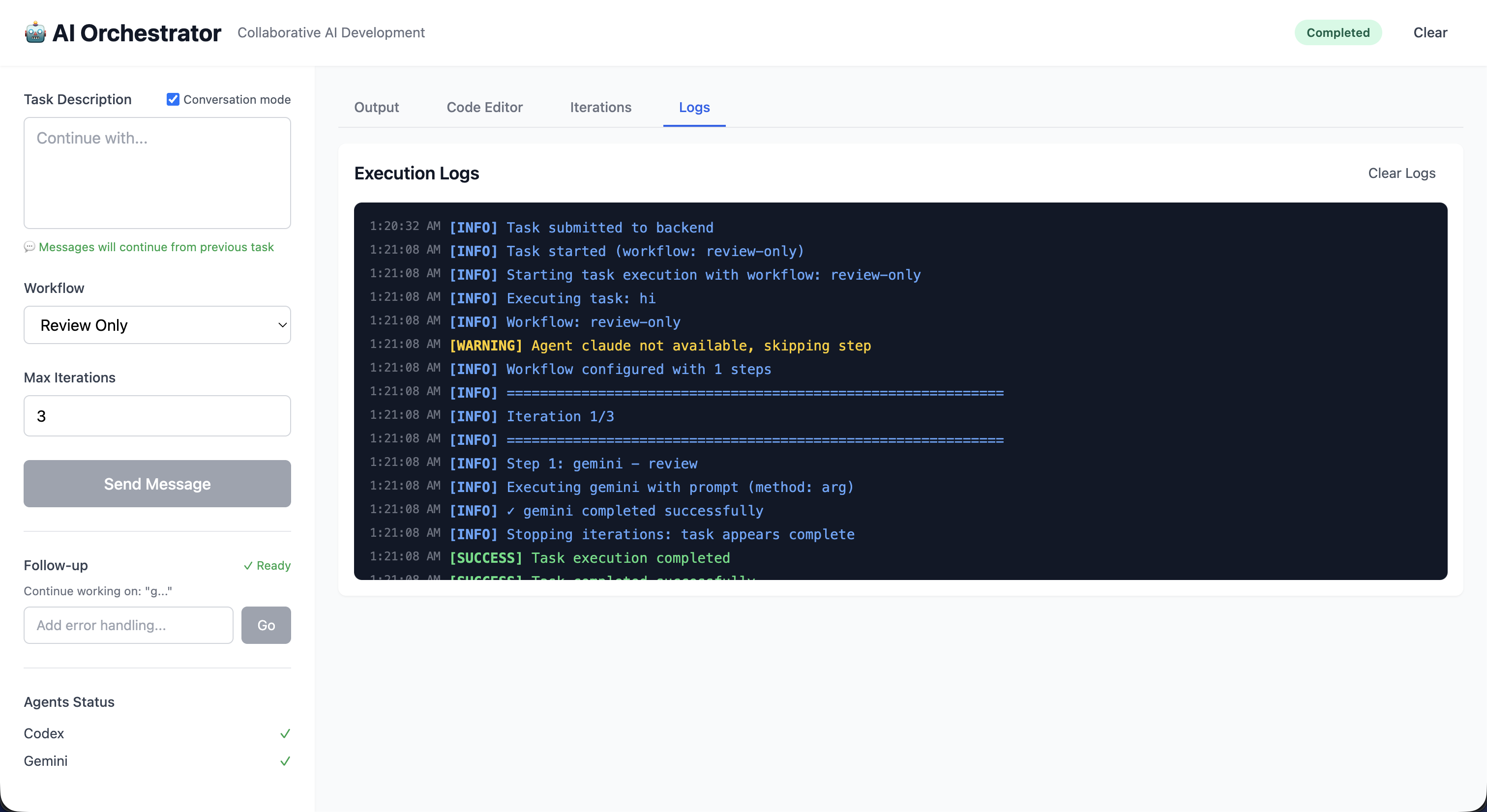
Modern Interface
Built with Vue 3, the Web UI provides a rich visual experience:
Technology Stack:
- Frontend: Vue 3 (Composition API), Vite, TailwindCSS
- State: Pinia for reactive state management
- Editor: Monaco Editor (VS Code engine)
- Real-time: Socket.IO for live updates
- Backend: Flask with Flask-SocketIO
Main Interface Components
Left Sidebar:
- Task input (multi-line textarea)
- Workflow selector dropdown
- Max iterations slider (1-10)
- Execute/Send Message button
- Agent status indicators (live)
- Generated files list (clickable)
Main Content Area:
- Output Tab: Full AI response with syntax highlighting
- Code Editor Tab: Monaco editor with VS Code features
- Iterations Tab: Detailed progress tracking
Header:
- Status badge (Idle/Running/Completed/Error)
- Conversation mode toggle
- Clear button
Real-Time Features
sequenceDiagram
    participant U as User Browser
    participant F as Flask Server
    participant O as Orchestrator

    U->>F: Submit Task (HTTP)
    F->>O: Execute Task

    loop Progress Updates
        O->>F: Progress Event
        F->>U: Socket.IO Update
        U->>U: Update UI
    end

    O->>F: Task Complete
    F->>U: Final Result
    U->>U: Display Output
Real-time Updates:
- Agent status changes
- Progress indicators
- File creation notifications
- Error alerts
- Completion notifications
Monaco Code Editor
Full-featured code editor integrated into the UI:
Features:
- Syntax highlighting for 100+ languages
- Line numbers and minimap
- Search and replace
- Multiple themes
- Keyboard shortcuts
- IntelliSense-style completion
- Error highlighting
- Code folding
File Operations:
- Open generated files with click
- Edit code in-place
- Download files individually
- Syntax-aware highlighting
- Auto-detection of language
Conversation Mode Toggle
Enable ChatGPT-like continuous conversations:
stateDiagram-v2
    [*] --> ConversationOff
    ConversationOff --> ConversationOn: Enable Toggle
    ConversationOn --> ConversationOff: Disable Toggle

    ConversationOff: Each message = New Task
    ConversationOn: Messages continue previous task
When Enabled:
- All messages automatically continue from previous task
- Button changes to “Send Message”
- Green indicator shows conversation is active
- Full context preserved across messages
- Visual hints show what you’re continuing
When Disabled:
- Each message starts fresh task
- Button shows “Execute Task”
- No automatic context carryover
Follow-Up Section
Separate green section for quick additions after task completion:
Features:
- Appears after any successful task
- Input box for follow-up message
- “Go” button to execute
- Works independently of conversation mode
- Shows previous task context
Use Cases:
- “add tests”
- “add error handling”
- “improve performance”
- “add documentation”
Conversation Mode
How It Works
CLI Implementation:
graph TD
    A[User Message] --> B{Analyze Message}
    B --> C{Short + Keywords?}
    C -->|Yes| D[Auto Follow-Up]
    C -->|No| E{Ambiguous?}
    E -->|Yes| F[Prompt User]
    E -->|No| G[New Task]
    F --> H{User Choice}
    H -->|Continue| D
    H -->|New| G
UI Implementation:
- Toggle checkbox controls mode
- Visual indicators show status
- Separate follow-up section
- Context preservation automatic
Context Preservation
What gets preserved in conversation mode:
context:
  previous_task: "create a REST API"
  previous_output: "Full AI response..."
  generated_files:
    - "api/routes.py"
    - "api/models.py"
  workspace: "./workspace"
  workflow: "default"
  timestamp: "2024-01-15T10:30:00Z"
Best Practices
Use Conversation Mode For:
- ✅ Iterative feature development
- ✅ Multi-step refactoring
- ✅ Progressive enhancement
- ✅ Debug-and-fix cycles
- ✅ Building complex features
Don’t Use For:
- ❌ Completely unrelated tasks
- ❌ Switching between projects
- ❌ One-off questions
- ❌ Starting fresh implementations
Workflow System
Workflow Execution Flow
graph TD
    START[Start] --> LOAD[Load Workflow Config]
    LOAD --> VALIDATE[Validate Configuration]
    VALIDATE --> INIT[Initialize Agents]
    INIT --> ITER{Iteration < Max?}

    ITER -->|Yes| EXEC[Execute Workflow Steps]
    EXEC --> AGENT1[Agent 1]
    AGENT1 --> AGENT2[Agent 2]
    AGENT2 --> AGENT3[Agent 3]

    AGENT3 --> COLLECT[Collect Feedback]
    COLLECT --> CHECK{Sufficient<br/>Suggestions?}

    CHECK -->|Yes| UPDATE[Update Context]
    UPDATE --> ITER

    CHECK -->|No| AGG[Aggregate Results]
    ITER -->|No| AGG

    AGG --> REPORT[Generate Report]
    REPORT --> END[End]
Iteration Control
Workflows can iterate until quality thresholds are met:
Iteration Triggers:
- Review produces significant suggestions
- Code quality metrics below threshold
- Manual iteration request
- Maximum iterations not reached
Stop Conditions:
- Fewer than
min_suggestions_thresholdsuggestions - Maximum iterations reached
- All quality checks pass
- Manual stop requested
Example:
settings:
  max_iterations: 3
  min_suggestions_threshold: 5
  quality_threshold: 0.8
AI Agent Integration
Agent Status Monitoring
graph TD
    A[Check Agent] --> B{Command Exists?}
    B -->|Yes| C{Authenticated?}
    B -->|No| D[Not Available]
    C -->|Yes| E[Available]
    C -->|No| F[Auth Required]

    E --> G[Test Execution]
    G --> H{Success?}
    H -->|Yes| I[Ready]
    H -->|No| J[Error State]
Status Indicators:
- ✅ Available - Ready to use
- ⚠️ Auth Required - Needs authentication
- ❌ Not Found - CLI not installed
- 🔴 Error - Configuration or execution error
Agent Capabilities
Codex (OpenAI):
- Primary implementation agent
- Excellent at code generation
- Pattern recognition
- Quick iterations
- Best for: Initial implementations, boilerplate
Gemini (Google):
- Code review specialist
- SOLID principles analysis
- Security vulnerability detection
- Performance optimization
- Best for: Code review, architecture analysis
Claude (Anthropic):
- Refinement and improvement
- Documentation generation
- Code explanation
- Context-aware modifications
- Best for: Refinement, documentation
Copilot (GitHub):
- Alternative suggestions
- Multiple implementation options
- Pattern-based recommendations
- Best for: Ideation, alternatives
Session Management
Save and Load Sessions
Persist entire conversation contexts for later:
What Gets Saved:
- Complete conversation history
- All generated files
- Workspace state
- Active workflow
- Agent configurations
- Timestamps and metadata
CLI Usage:
# Save session
orchestrator > /save my-project

# Load session
./ai-orchestrator shell --load my-project

# Or within shell
orchestrator > /load my-project

# List saved sessions
./ai-orchestrator sessions
File Format (JSON):
{
  "session_id": "uuid-here",
  "created_at": "2024-01-15T10:00:00Z",
  "workflow": "default",
  "conversation_history": [
    {
      "role": "user",
      "content": "create a REST API",
      "timestamp": "2024-01-15T10:00:00Z"
    },
    {
      "role": "assistant",
      "content": "API created...",
      "files": ["api.py", "models.py"],
      "timestamp": "2024-01-15T10:01:30Z"
    }
  ],
  "workspace": "./workspace",
  "metadata": {}
}
File Management
Workspace Organization
workspace/
├── session-uuid/
│   ├── api/
│   │   ├── routes.py
│   │   ├── models.py
│   │   └── __init__.py
│   ├── tests/
│   │   └── test_api.py
│   └── docs/
│       └── README.md
File Tracking
The orchestrator tracks all generated files:
graph LR
    A[Agent Response] --> B[Extract Code Blocks]
    B --> C[Parse File Paths]
    C --> D[Validate Paths]
    D --> E{Exists?}
    E -->|Yes| F[Create Backup]
    E -->|No| G[Create File]
    F --> G
    G --> H[Register File]
    H --> I[Update UI]
Features:
- Automatic file extraction from AI responses
- Backup of existing files
- Path validation and sanitization
- File registry for tracking
- Click-to-open in UI
File Operations
CLI:
# Files listed after task completion
📁 Generated Files:
  📄 api/routes.py
  📄 api/models.py
  📄 tests/test_api.py

Workspace: ./workspace/session-abc123
UI:
- Click file to view in Monaco editor
- Edit and save changes
- Download individual files
- Syntax highlighting based on extension
- Line-by-line diff view
Security Features
Input Validation
All user inputs are validated and sanitized:
class SecurityValidator:
    def validate_task(self, task: str) -> bool:
        # Command injection prevention
        if self._contains_shell_metacharacters(task):
            raise SecurityError("Potential command injection")

        # Path traversal prevention
        if self._contains_path_traversal(task):
            raise SecurityError("Path traversal detected")

        # Length validation
        if len(task) > MAX_TASK_LENGTH:
            raise ValidationError("Task too long")

        return True
Protected Against:
- Command injection
- Path traversal attacks
- SQL injection (if using database)
- XSS attacks in UI
- Malicious code execution
Rate Limiting
Token bucket algorithm prevents abuse:
graph LR
    A[Request] --> B{Tokens Available?}
    B -->|Yes| C[Consume Token]
    B -->|No| D[Rate Limit Error]
    C --> E[Process Request]
    E --> F[Refill Tokens Over Time]
Configuration:
rate_limiting:
  enabled: true
  requests_per_minute: 10
  burst_size: 20
  per_user: true
Audit Logging
All security-relevant events are logged:
logger.info(
    "security_event",
    event_type="task_execution",
    user_id="user-123",
    task_hash="abc...",
    timestamp="2024-01-15T10:00:00Z",
    success=True
)
Logged Events:
- Authentication attempts
- Authorization failures
- Rate limit violations
- Input validation failures
- Suspicious activities
Monitoring & Metrics
Prometheus Metrics
Comprehensive metrics for production monitoring:
Task Metrics:
orchestrator_tasks_total
orchestrator_task_duration_seconds
orchestrator_task_failures_total
orchestrator_task_success_rate
Agent Metrics:
orchestrator_agent_calls_total
orchestrator_agent_errors_total
orchestrator_agent_response_time_seconds
orchestrator_agent_availability
System Metrics:
orchestrator_cache_hits_total
orchestrator_cache_misses_total
orchestrator_active_sessions
orchestrator_memory_usage_bytes
Health Checks
Endpoints:
/health- Overall system health/ready- Readiness for traffic/metrics- Prometheus metrics
Health Check Response:
{
  "status": "healthy",
  "version": "1.0.0",
  "agents": {
    "claude": "available",
    "codex": "available",
    "gemini": "available"
  },
  "uptime_seconds": 3600,
  "active_sessions": 5
}
Advanced Features
Caching System
Multi-layer caching for performance:
Cache Layers:
- In-Memory - Fast, 5-minute TTL
- File-Based - Persistent, 24-hour TTL
- Distributed - Redis (optional)
Cache Strategy:
graph TD
    A[Request] --> B{Memory Cache?}
    B -->|Hit| C[Return Result]
    B -->|Miss| D{File Cache?}
    D -->|Hit| E[Load to Memory]
    E --> C
    D -->|Miss| F[Execute Task]
    F --> G[Cache Result]
    G --> C
Async Execution
Parallel execution where possible:
async def execute_parallel_agents(agents, task):
    results = await asyncio.gather(
        *[agent.execute_async(task) for agent in agents],
        return_exceptions=True
    )
    return [r for r in results if not isinstance(r, Exception)]
Retry Logic
Automatic retry with exponential backoff:
@retry(
    stop=stop_after_attempt(3),
    wait=wait_exponential(multiplier=1, min=2, max=10),
    retry=retry_if_exception_type(TransientError)
)
def execute_with_retry(agent, task):
    return agent.execute(task)
Circuit Breaker
Prevent cascading failures:
stateDiagram-v2
    [*] --> Closed
    Closed --> Open: Failure Threshold
    Open --> HalfOpen: Timeout
    HalfOpen --> Closed: Success
    HalfOpen --> Open: Failure

    Closed: Normal Operation
    Open: Reject Requests
    HalfOpen: Test Recovery
For more information: