Production Ready

AI Coding Tools Orchestrator

Five independent systems coordinating AI coding assistants with enterprise-grade agentic infrastructure: specialized agents, skills library, 34+ MCP tools, project-scoped context memory, and Graphify codebase knowledge graphs

Python 3.8+ Vue 3 Nuxt 3 Docker Ready Kubernetes Prometheus MCP Server FastMCP 3.x Flask Socket.IO Pydantic TailwindCSS Monaco Editor Chart.js Terraform GitHub Actions structlog Grafana 386+ Tests 6 AI Agents Python 3.8+ Vue 3 Nuxt 3 Docker Ready Kubernetes Prometheus MCP Server FastMCP 3.x Flask Socket.IO Pydantic TailwindCSS Monaco Editor Chart.js Terraform GitHub Actions structlog Grafana 386+ Tests 6 AI Agents 9 Specialized Agents 24 Skills 34+ MCP Tools Graph Context Hybrid Search Sentence Transformers
Dual Runtime: Orchestrator + Agentic Team
9 Specialized Agents + 24 Skills + 34+ MCP Tools
Graph Context Memory with Hybrid Search
Production Monitoring and Resilience
Enterprise Security & Audit Logging
Extensible Plugin & Adapter Architecture

Overview

Multi-Agent Collaboration

Coordinate Claude, Codex, Gemini, Copilot, and local model backends with intelligent workflows.

Interactive CLI & Web UI

Choose between a powerful command-line interface or modern web UI with real-time updates.

Configurable Workflows

Define custom collaboration patterns or use built-in workflows for different scenarios, including offline and hybrid execution.

Production Ready

Security, monitoring, rate limiting, retry logic, and comprehensive test coverage built-in.

Agentic Infrastructure

9 specialized agents, 24 skills, and 34+ MCP tools provide enterprise-grade support for any development task.

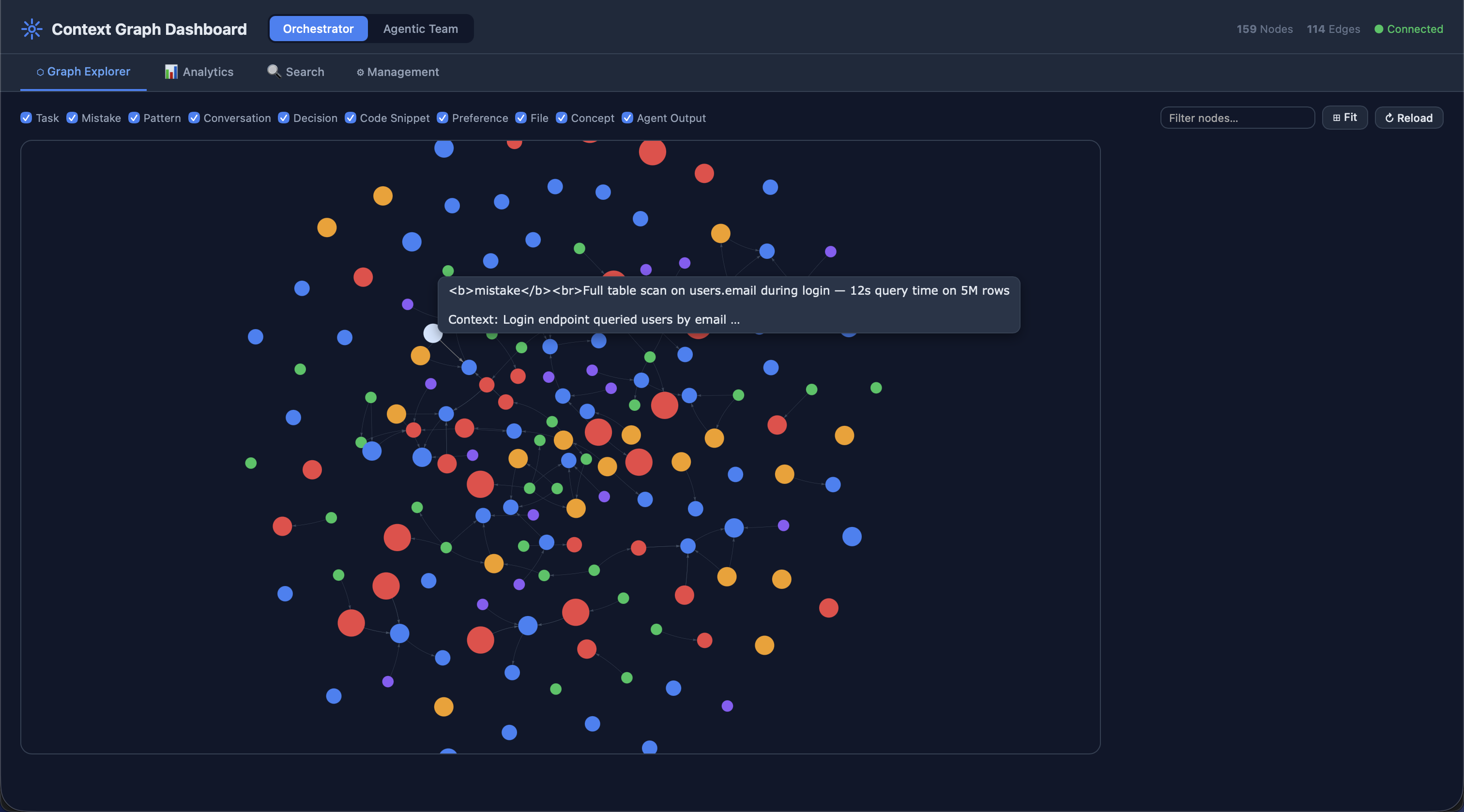
Project-Scoped Context Memory

Graph-based memory with hybrid search and project-scoped isolation lets agents learn from past tasks and avoid repeating mistakes.

Graphify

Turn any directory into a queryable knowledge graph. AST-based code analysis for 19 languages, REST API, interactive HTML visualization, and multi-format export (JSON, GraphML, DOT, Markdown, Obsidian vault).

Obsidian Vault Export

Export code graphs and context memory as Obsidian vaults. Pre-configured graph view with color-coded node types, [[wikilinks]], and YAML frontmatter - across all three graph systems.

Agentic Team Runtime

Multi-role team collaboration with free inter-agent communication, lead-gated responses, configurable turn limits, and live communication graphs.

The project is organized into five standalone systems - Orchestrator, Agentic Team, MCP Server, Context Dashboard, and Graphify - and is built to coordinate real coding workflows across Claude, Codex, Gemini, Copilot, and local backends. Orchestrator drives step-based execution and fallback, Agentic Team runs role-based collaboration, MCP Server exposes automation tools, Context Dashboard surfaces memory/telemetry, and Graphify builds AST-powered knowledge graphs across 19 programming languages.

Local model note: Local adapters are fully wired into routing/offline/fallback flows, but they currently return text outputs only and do not directly edit files. They are best for offline drafting, review, and continuity fallback.

How It Works

graph LR
    A[User Request] --> B[AI Orchestrator]
    B --> C{Offline Mode?}
    C -->|Yes| D[Route to Local Agent by type]
    C -->|No| E[Route to Cloud or Local Agent]
    D --> F[Execute Workflow Step]
    E --> F
    F --> G{Step Success?}
    G -->|Yes| H[Next Step]
    G -->|Recoverable failure| I[Fallback Agent]
    I --> H
    H --> J[Final Output + Files]

    style A fill:#3b82f6,stroke:#3b82f6,color:#fff
    style B fill:#2563eb,stroke:#2563eb,color:#fff
    style D fill:#10b981,stroke:#10b981,color:#fff
    style E fill:#60a5fa,stroke:#60a5fa,color:#fff
    style I fill:#60a5fa,stroke:#60a5fa,color:#fff
    style J fill:#10b981,stroke:#059669,color:#fff
                
6
AI Agent Adapters
52
Python Modules
386
Automated Tests
34+
MCP Tools
7
Workflows
5
Independent Systems
9
Specialized Agents
24
Reusable Skills
10
Node Types
12
Edge Types

Core Features

Multi-Agent Collaboration

Coordinate multiple AI assistants with specialized roles:

  • Codex: Initial implementation
  • Gemini: Code review & analysis
  • Claude: Refinement & documentation
  • Copilot: Alternative suggestions
  • Ollama/llama.cpp: Local offline execution

Offline + Local LLM Support

  • Run local-only workflows with --offline
  • Dynamic agent keys resolved by type
  • Supported local types: ollama, llamacpp, localai, text-generation-webui
  • Built-in cloud-to-local fallback routing
  • CLI local model lifecycle: status/list/pull/remove
  • Limitation: local adapters return text output only and do not directly edit files
  • Best use: offline drafting/review and cloud-to-local fallback; use CLI agents for direct file edits

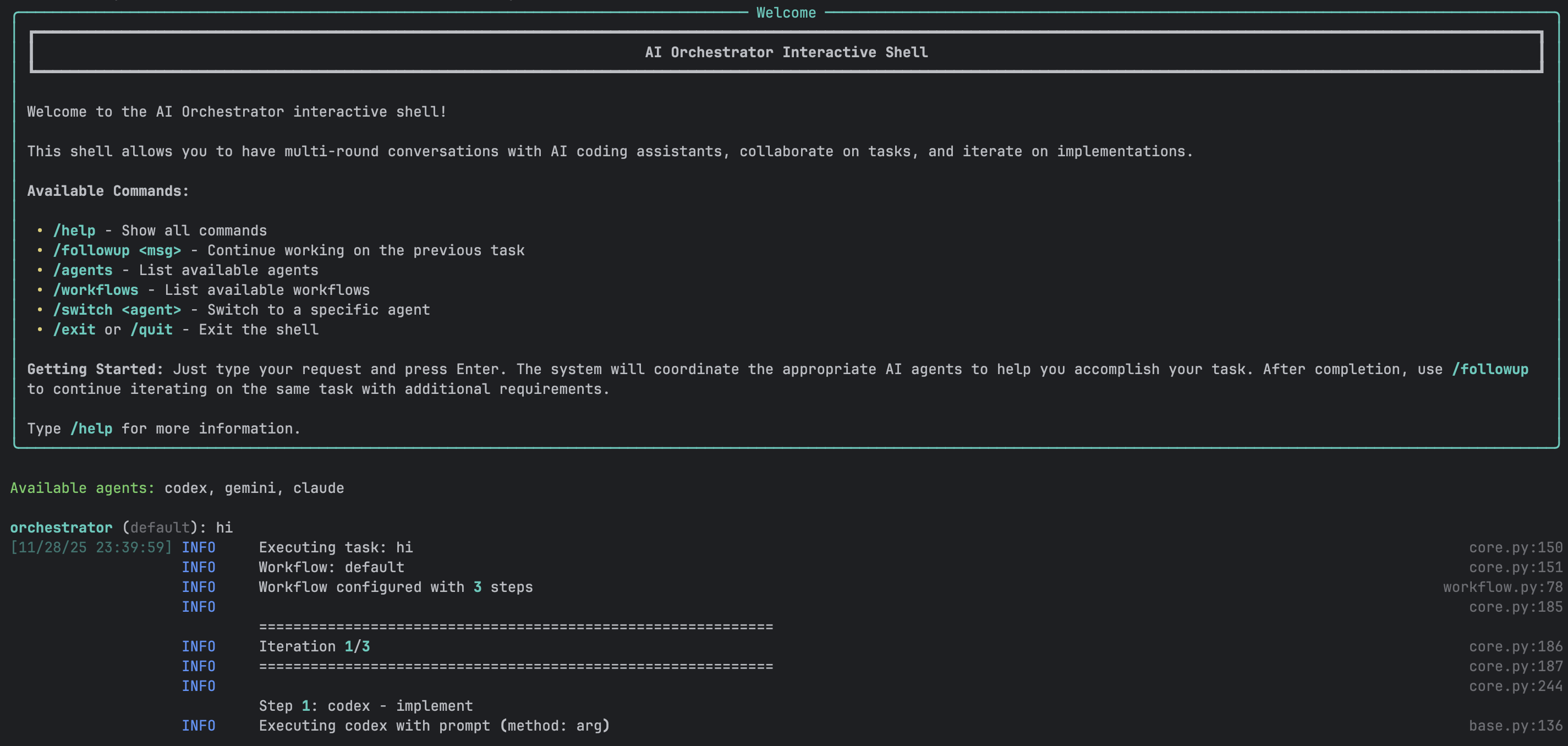
Interactive Shell

  • REPL-style conversation interface
  • Smart follow-up detection
  • Full readline support & history
  • Session save/restore
  • Colored output with Rich

Modern Web UI

  • Vue 3 with Composition API
  • Real-time updates via Socket.IO
  • Monaco code editor (VS Code)
  • Pinia state management
  • File management & downloads
  • Conversation mode toggle

Monitoring, Metrics & Reports

  • Prometheus metrics integration
  • Structured logging (structlog)
  • Health & readiness checks
  • Auto-generated execution reports (JSON)
  • Interactive HTML dashboard with Chart.js
  • Agent performance & workflow analytics

Security Features

  • Input validation & sanitization
  • Rate limiting (token bucket)
  • Audit logging
  • Secret management
  • Security scanning (Bandit)

Performance

  • Async execution support
  • Multi-layer caching
  • Connection pooling
  • Retry logic with backoff
  • Circuit breaker pattern

Deployment Options

  • Docker & Docker Compose
  • Kubernetes manifests
  • Systemd service files
  • CI/CD with GitHub Actions
  • Multi-environment configs

Code Quality

  • Pylint 10.00/10 (zero warnings)
  • 386+ tests (pytest)
  • 15 pre-commit hooks passing
  • Black + isort + flake8 + MyPy
  • Type hints with Pydantic

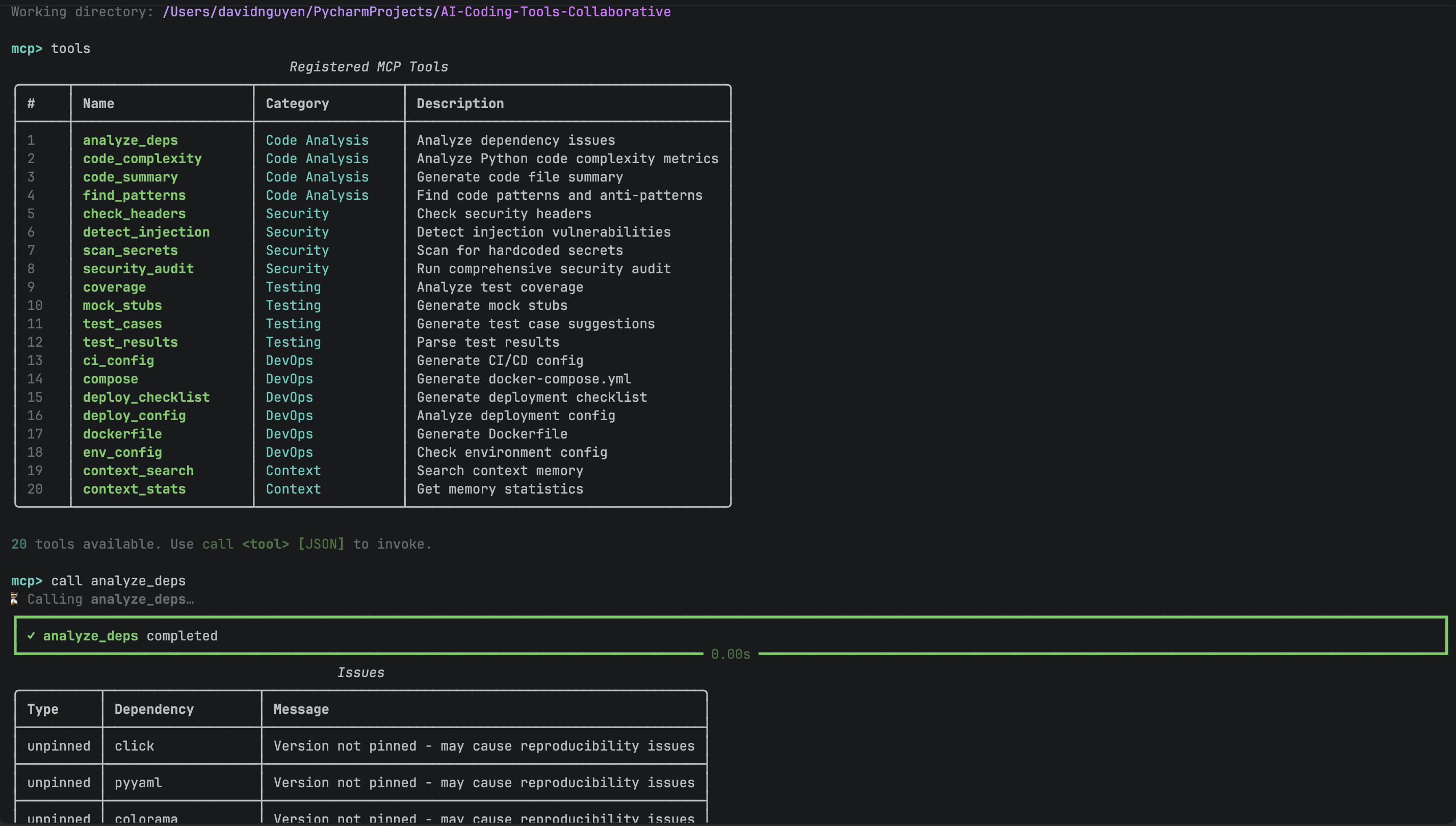
MCP Server (Model Context Protocol)

  • FastMCP 3.x - 34+ tools, 2 resources
  • Claude Desktop integration (stdio)
  • Remote access via HTTP transport
  • Both engines accessible from any MCP client
  • Python client wrappers included

Graph Context Memory

  • SQLite + FTS5 graph database
  • 10 node types, 12 edge types
  • Hybrid search (BM25 + semantic)
  • Sentence transformer embeddings
  • Auto-storage of tasks & mistakes
  • Obsidian vault export with graph view

Specialized Agents & Skills

  • 9 domain-specific agents (Claude + Codex)
  • 24 reusable skills across 6 categories
  • 10 domain-specific rules per platform
  • Web, API, Security, DevOps, AI/ML, DB
  • Extensible YAML/TOML configuration

Graphify

  • AST analysis for 19 languages via tree-sitter grammars
  • SQLite + FTS5 graph store with WAL mode
  • REST API (34+ endpoints) with Flask
  • Interactive HTML visualization (vis.js)
  • Multi-format export: JSON, GraphML, DOT, Markdown, Obsidian
  • File watcher for live incremental rebuilds
  • God-node detection & hotspot analysis
  • Thread-safe, project-scoped, enterprise-grade

Obsidian Integration

  • Export all 3 graph systems as Obsidian vaults
  • [[Wikilinks]] between nodes - classes, tasks, decisions
  • YAML frontmatter with type, tags, importance, timestamps
  • Pre-configured .obsidian/graph.json color groups
  • _Index.md Map of Content with stats & category links
  • Dark theme & core plugins auto-enabled

Agentic Team Runtime

  • 5 specialist roles with free inter-role communication
  • Team Lead gatekeeping for final responses
  • Configurable turn limits & escalation safety
  • Live communication graph & timeline UI
  • Independent context memory & fallback routing
  • Dedicated REPL & web studio interface

Agentic Infrastructure

Beyond the core engines, we provide enterprise-grade infrastructure that empowers AI agents to accomplish any development task effectively. This includes specialized agents, reusable skills, MCP tools, and persistent context memory with project-scoped isolation.

Infrastructure Overview

graph TB
    subgraph "🧠 Agentic Infrastructure"
        direction TB

        subgraph AGENTS["Specialized Agents (9)"]
            WEB[Web Frontend]
            API[Backend API]
            SEC[Security]
            OPS[DevOps]
            ML[AI/ML]
            DB[Database]
        end

        subgraph SKILLS["Skills Library (22)"]
            DEV[Development]
            TEST[Testing]
            SECS[Security Skills]
            DEVOPS[DevOps Skills]
            AIML[AI/ML Skills]
            DOCS[Documentation]
        end

        subgraph TOOLS["MCP Tools (34+)"]
            CODE[Code Analysis]
            SCAN[Security Scan]
            TTOOLS[Testing]
            DTOOLS[DevOps]
            CTX[Context Memory]
        end

        subgraph CONTEXT["Graph Context System"]
            GRAPH[(SQLite + FTS5)]
            SEARCH[Hybrid Search]
            EMBED[Embeddings]
        end
    end

    AGENTS --> SKILLS
    SKILLS --> TOOLS
    TOOLS --> CONTEXT
          

Specialized Agents (9)

Domain experts for every development area:

  • web-frontend: React, Vue, Angular, CSS
  • backend-api: REST, GraphQL, Microservices
  • security-specialist: OWASP, Secure Coding
  • devops-infrastructure: Docker, K8s, CI/CD
  • ai-ml-engineer: ML Pipelines, RAG, LLMs
  • database-architect: Schema, Optimization

Skills Library (22)

Reusable task templates across 6 categories:

  • Development: react-components, rest-api-design
  • Testing: unit-testing, integration-testing, tdd
  • Security: input-validation, authentication
  • DevOps: docker, ci-cd, kubernetes
  • AI/ML: embeddings, llm-integration, rag
  • Docs: api-docs, architecture-docs

MCP Tools (34+)

Tools exposed via Model Context Protocol:

  • Code Analysis: complexity, patterns, deps
  • Security: secrets scan, injection detection
  • Testing: test cases, stubs, coverage
  • DevOps: dockerfile, compose, CI config
  • Context: store, search, log mistakes

Graph Context System

Persistent memory with intelligent retrieval:

  • 10 Node Types: Task, Mistake, Pattern, etc.
  • 12 Edge Types: RELATED_TO, CAUSED_BY, etc.
  • Hybrid Search: BM25 + Semantic embeddings
  • Auto-storage: Tasks stored automatically
  • Learning: Agents learn from mistakes
  • Project Scoping: Project-scoped context graphs with multi-project isolation, automatic codebase scanning, and portable configuration via PROJECT_PATH
  • Obsidian Export: Export context graphs as Obsidian vaults with [[wikilinks]], color-coded graph view, and YAML frontmatter

Domain Rules (10)

Enforce best practices across domains:

  • Security: OWASP, input validation
  • Database: Indexing, query optimization
  • API Design: REST/GraphQL standards
  • Performance: Caching, async patterns
  • AI/ML: Pipeline best practices

Extensibility

Easy to extend with new capabilities:

  • Add agents: YAML/TOML definitions
  • Add skills: Markdown templates
  • Add tools: Python MCP functions
  • Add rules: Domain-specific guidelines
  • Plug & play: No code changes needed

Graph Context System

graph TB
    subgraph "Context System"
        subgraph "Storage"
            SQLITE[(SQLite DB)]
            FTS5[FTS5 Index]
            VEC[(Vectors)]
        end

        subgraph "Nodes"
            CONV[Conversations]
            TASK[Tasks]
            MISTAKE[Mistakes]
            PATTERN[Patterns]
        end

        subgraph "Search"
            BM25[BM25]
            EMBED[Embeddings]
            RRF[RRF Fusion]
        end

        subgraph "Export"
            JSONX[JSON]
            GMLX[GraphML]
            OBSX["Obsidian Vault
[[wikilinks]] + graph.json"] end end CONV & TASK & MISTAKE --> SQLITE SQLITE --> FTS5 EMBED --> VEC BM25 & EMBED --> RRF SQLITE --> JSONX & GMLX & OBSX

System Architecture

The AI Orchestrator follows a modular, layered architecture with clear separation of concerns. Five independent systems - Orchestrator, Agentic Team, MCP Server, Context Dashboard, and Graphify - each have their own CLI, config, and adapters with zero cross-imports.

Runtime controls include offline detection, fallback management, local model endpoint probing, and Graphify codebase knowledge graphs for deep project understanding.

flowchart TB
    subgraph "User
Interfaces" CLI[CLI Shell
Click + Rich] WebUI[Web UI
Vue 3 + Socket.IO] MCP[MCP Server
FastMCP 3.x] end subgraph "Core
Orchestrator" Engine[Orchestration
Engine] Workflow[Workflow
Manager] Config[Config
Manager] Session[Session
Manager] Router[Type-based
Adapter Resolver] end subgraph "Cross-Cutting
Concerns" Metrics[Prometheus
Metrics] Cache[Response
Cache] Retry[Retry
Logic] Security[Security
Layer] end subgraph "AI
Adapters" Claude[Claude
Adapter] Codex[Codex
Adapter] Gemini[Gemini
Adapter] Copilot[Copilot
Adapter] Ollama[Ollama
Adapter] LlamaCpp[LlamaCpp
Adapter] end subgraph "Runtime
Controls" Offline[Offline
Detector] Fallback[Fallback
Manager] ModelStatus[Local Model
Status Probe] end subgraph "External AI
Tools" ClaudeCLI[Claude Code
CLI] CodexCLI[OpenAI Codex
CLI] GeminiCLI[Google Gemini
CLI] CopilotCLI[GitHub Copilot
CLI] OllamaAPI[Ollama API
/api/generate] OpenAICompat[Local OpenAI-Compatible API
/v1/completions] end CLI --> Engine WebUI --> Engine MCP --> Engine Engine --> Workflow Engine --> Config Engine --> Session Engine --> Router Engine --> Offline Engine --> Fallback WebUI --> ModelStatus ModelStatus --> OllamaAPI ModelStatus --> OpenAICompat Workflow --> Metrics Workflow --> Cache Workflow --> Retry Workflow --> Security Workflow --> Claude Workflow --> Codex Workflow --> Gemini Workflow --> Copilot Workflow --> Ollama Workflow --> LlamaCpp Claude --> ClaudeCLI Codex --> CodexCLI Gemini --> GeminiCLI Copilot --> CopilotCLI Ollama --> OllamaAPI LlamaCpp --> OpenAICompat style CLI fill:#3b82f6,stroke:#3b82f6,color:#fff style WebUI fill:#3b82f6,stroke:#3b82f6,color:#fff style Engine fill:#60a5fa,stroke:#60a5fa,color:#fff style Workflow fill:#10b981,stroke:#10b981,color:#fff style Offline fill:#f59e0b,stroke:#d97706,color:#fff style Fallback fill:#a78bfa,stroke:#7c3aed,color:#fff

1. Interface Layer

User-facing interfaces: CLI and Web UI

2. Orchestration Layer

Core business logic and workflow management

3. Cross-Cutting Layer

Security, caching, metrics, and logging

4. Adapter Layer

AI agent integrations with uniform interface

5. External Services

Third-party AI CLI tools

Design Patterns

Adapter Pattern

Uniform interface to different AI CLIs

Strategy Pattern

Configurable workflow strategies

Observer Pattern

Real-time UI updates via Socket.IO

Factory Pattern

Agent and workflow creation

Singleton Pattern

Config and metrics managers

Decorator Pattern

Retry, cache, and logging decorators

Standalone Agentic Team Runtime

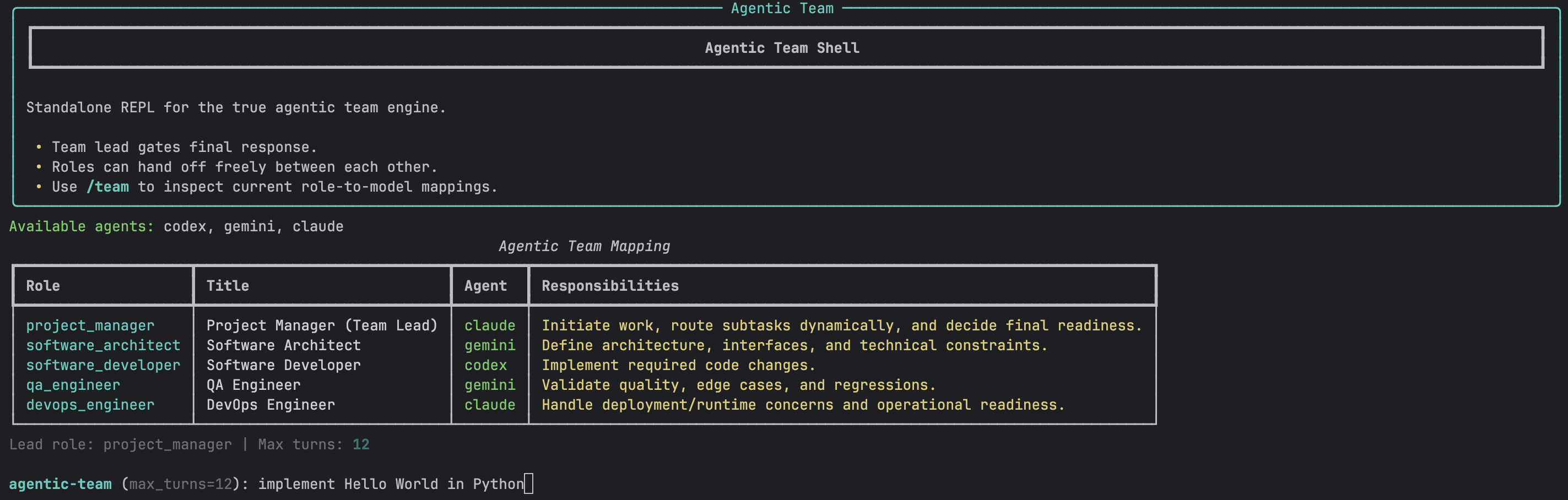
Agentic Team is a separate runtime path from orchestrator workflows. It models a true software team where roles route work to each other at runtime, and only the lead role can finalize the user-facing response.

This path has its own backend/UI (agentic_team/orchestrator/ui/app.py), its own CLI REPL (./ai-orchestrator agentic-shell), dedicated validation, and live communication graph/timeline streaming.

Runtime Separation and Role Routing

flowchart LR
    subgraph Orchestrator Path
      OCLI[ai-orchestrator run/shell] --> OCORE[orchestrator.core]
      OCORE --> OWF[predefined workflow steps]
    end

    subgraph Agentic Team Path
      AUI[agentic_team/orchestrator/ui/app.py]
      ASHELL[ai-orchestrator agentic-shell]
      AUI --> AENGINE[agentic_team.engine]
      ASHELL --> AENGINE
      AENGINE --> PM[project_manager]
      PM --> SA[software_architect]
      PM --> SD[software_developer]
      PM --> QA[qa_engineer]
      PM --> DO[devops_engineer]
      SA --> SD
      SD --> QA
      SD --> DO
      QA --> PM
      DO --> PM
      PM --> USER[final response to user]
    end

    style OCLI fill:#3b82f6,stroke:#3b82f6,color:#fff
    style OCORE fill:#2563eb,stroke:#2563eb,color:#fff
    style AENGINE fill:#10b981,stroke:#10b981,color:#fff
    style PM fill:#f59e0b,stroke:#d97706,color:#fff
    style USER fill:#60a5fa,stroke:#60a5fa,color:#fff
          

True Runtime Routing

  • Any role can route to any team role at runtime
  • Decision output supports message and finalize
  • Non-lead finalize attempts are normalized to lead handoff
  • Invalid destinations are rerouted to lead safely

Live Communications

  • Socket events: team_turn, team_communication, progress_log
  • Directed live graph with edge counts and latest path highlight
  • Readable communication stream panel in dedicated UI section
  • Session snapshots preserve turn and communication history

Config + Validation Gate

  • Guided config editor for agentic_team.roles
  • Role-to-agent mappings validated before every run
  • Missing/unavailable mappings block execution early
  • Defaults are merged when team config is incomplete

Production Controls

  • Execution IDs, timestamps, duration, and turn stats
  • Fallback manager integration for recoverable failures
  • Repeat-route escalation protection to lead role
  • Runtime settings for message and routing safety limits

Context Integration

  • Auto-stores tasks in graph context memory
  • Retrieves relevant past context before execution
  • Learns from mistakes across sessions
  • Pattern recognition for recurring issues

Multi-Turn Orchestration

  • Complex multi-step task decomposition
  • Role-based specialization per turn
  • Automatic handoff with context preservation
  • Configurable turn limits and timeouts
Role Purpose Typical Outgoing Handoffs
project_manager Lead, planning, gating final response architect, developer, QA, DevOps, or finalize to user
software_architect Architecture and constraints developer or PM
software_developer Implementation QA, DevOps, or PM
qa_engineer Validation and regressions developer or PM
devops_engineer Runtime and deployability developer or PM

Example Communication Sequence

sequenceDiagram
    participant PM as project_manager (claude)
    participant DEV as software_developer (codex)
    participant QA as qa_engineer (gemini)
    participant USER as user

    PM->>DEV: action=message
"Implement endpoint + tests" DEV->>QA: action=message
"Implementation complete, validate" QA->>PM: action=message
"Validation passed" PM->>USER: action=finalize
"Ready to ship"

Agentic Team Run Commands

# Start standalone UI backend
./start-agentic-ui.sh

# Start standalone REPL
./ai-orchestrator agentic-shell

# Inspect team mappings in REPL
/team
/validate

# Full docs (protocol, examples, failure handling)
open AGENTIC_TEAM.md

Graphify - Codebase Knowledge Graphs

The fifth standalone system in the project. Graphify turns any directory into a queryable knowledge graph using deterministic AST analysis - no LLM required for code. It supports 19 programming languages via tree-sitter grammars, provides a full REST API with 34+ endpoints, interactive HTML visualization, Obsidian vault export with color-coded graph view, and multi-format export. Built for enterprise-grade production use with thread-safe SQLite + FTS5 storage, file watching for incremental rebuilds, and project-scoped isolation.

Graphify Architecture

graph TB
    subgraph Input["Input Layer"]
        CLI["CLI (Click)"]
        API["REST API (Flask)"]
        Watch["File Watcher"]
    end

    subgraph Core["Core Engine"]
        Scanner["Scanner"]
        Cache["SHA-256 Cache"]
        Graph["GraphStore (SQLite + FTS5)"]
    end

    subgraph Analyzers["Language Analyzers (19 languages)"]
        PY["Python"]
        JS["JavaScript"]
        TS["TypeScript"]
        GO["Go"]
        RS["Rust"]
        JV["Java"]
        MORE["C, C++, Ruby, C#, Kotlin, Scala, PHP, Swift, Lua, Zig, Elixir, ObjC"]
    end

    subgraph Output["Output Layer"]
        HTML["HTML Visualization (vis.js)"]
        JSON["JSON Export"]
        GML["GraphML Export"]
        DOT["DOT / Graphviz"]
        MD["Markdown Report"]
        OBS["Obsidian Vault"]
    end

    CLI --> Scanner
    API --> Graph
    Watch --> Scanner
    Scanner --> Cache
    Scanner --> Analyzers
    Analyzers --> Graph
    Graph --> Output
          

19-Language AST Analysis

  • Tree-sitter grammars for deterministic parsing
  • Extracts classes, functions, imports, call graphs
  • Rationale comments (WHY, HACK, NOTE, TODO)
  • Docstrings, decorators, and type annotations
  • Zero LLM cost - fully local analysis

Enterprise Graph Store

  • SQLite with WAL mode for concurrent reads
  • FTS5 full-text search on all node content
  • Thread-local connections for safety
  • SHA-256 file caching - only re-analyze changed files
  • Project-scoped isolation with deterministic IDs

REST API (34+ Endpoints)

  • Full CRUD for nodes, edges, and projects
  • Search, query, and graph traversal endpoints
  • Analytics: god nodes, hotspots, communities
  • Snapshot management and health checks
  • CORS support with configurable origins

Visualization & Export

  • Interactive HTML graph with vis.js - click, search, filter
  • Obsidian vault export with [[wikilinks]], typed folders, and graph-view color groups
  • JSON export for downstream tooling
  • GraphML for Gephi / yEd
  • DOT format for Graphviz rendering
  • Markdown report with god nodes and statistics

Incremental & Watch Mode

  • File watcher detects changes and triggers rebuilds
  • SHA-256 cache skips unchanged files on re-scans
  • Configurable ignore patterns (.graphifyignore)
  • Debounced batch processing for rapid edits
  • Background-safe with proper signal handling

Graph Intelligence

  • God-node detection - highest-degree concepts
  • Hotspot analysis - files with most connections
  • Shortest-path queries between any two nodes
  • Subgraph extraction for focused analysis
  • Comprehensive project statistics and reports

Obsidian Vault Export

  • Export code graphs as Obsidian vaults
  • [[Wikilinks]] between nodes - classes, functions, files, tests
  • YAML frontmatter with type, language, tags, line ranges
  • Pre-configured .obsidian/graph.json with color-coded node types
  • _Index.md Map of Content with stats and category links
  • Dark theme & core plugins auto-enabled out of the box
  • Also available on Orchestrator & Agentic Team context graphs

Production Hardening

  • Schema migrations (v1→v2→v3) - automatic upgrades on open
  • Thread-local SQLite connections for concurrency safety
  • Input validation with bounded parameters (max 10,000 nodes)
  • Path traversal protection on all file operations
  • Structured exception hierarchy - 12 typed error classes
  • WAL mode for non-blocking reads during writes

Analytics & Reporting

  • Scan metrics - duration, cache rates, per-analyzer timing
  • Graph snapshots & diffing - track evolution over time
  • Community detection for module clustering
  • Complexity hotspot scoring across files
  • Comprehensive project statistics dashboard
  • Historical trend tracking for graph growth

Graphify Usage

# Scan a project directory
graphify scan /path/to/project

# Search the knowledge graph
graphify search "authentication" --limit 20

# Query connections between concepts
graphify query "What connects UserAuth to Database?"

# Find shortest path between nodes
graphify find-path "AuthController" "DatabasePool"

# Generate a full report
graphify report /path/to/project

# Export to multiple formats
graphify export --format json --output graph.json
graphify export --format html --output graph.html
graphify export --format graphml --output graph.graphml

# Export as Obsidian vault for interactive graph exploration
graphify export obsidian /path/to/project --output ./code-vault
# → Open ./code-vault in Obsidian, press Ctrl/Cmd+G for graph view

# Start the REST API server
graphify serve --port 5000

# Watch for file changes and rebuild incrementally
graphify watch /path/to/project

# Detect god nodes (highest connectivity)
graphify god-nodes --limit 10

# Analyze hotspots (most-connected files)
graphify hotspots --limit 10

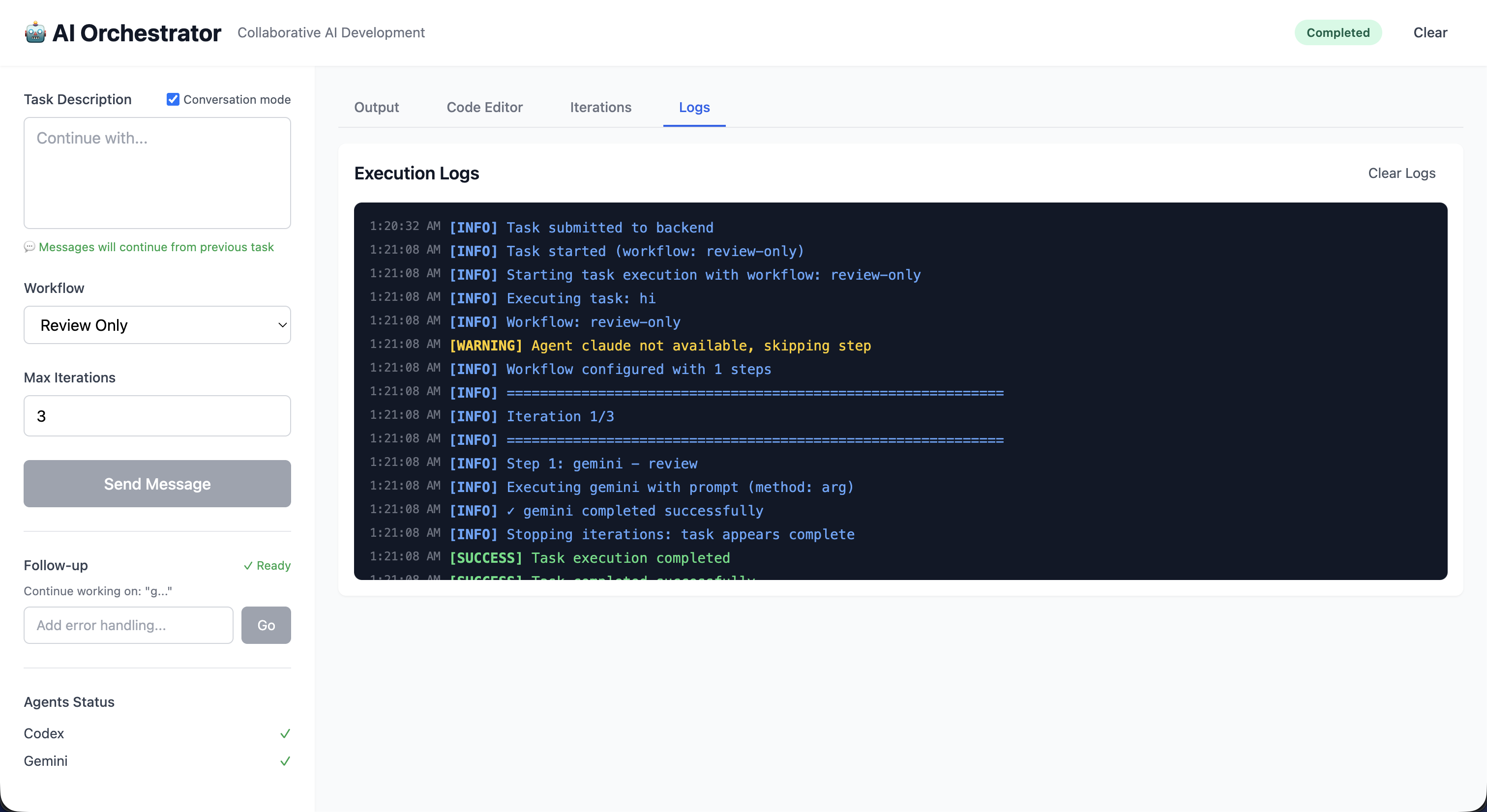
Screenshots

Selected product views from the repository screenshot set to give a quick visual tour before diving into architecture and implementation details.
Quick Start

1

Clone Repository

git clone <repository-url>
cd AI-Coding-Tools-Collaborative
2

Install Dependencies

pip install -r requirements.txt
chmod +x ai-orchestrator
3

Verify Installation

./ai-orchestrator --help
./ai-orchestrator agents
4

Start Interactive Shell

./ai-orchestrator shell

Local/Offline Quick Start

# Start local backend (example: Ollama)
ollama serve
ollama pull codellama:13b

# Check local backend and model status
./ai-orchestrator models status

# Run local-only workflow
./ai-orchestrator run "Build a Python CLI todo app" --workflow offline-default --offline

Prerequisites

  • Python 3.8+ - Core runtime
  • Node.js 20+ - For Web UI (optional)
  • At least one AI CLI - Claude, Codex, Gemini, or Copilot
  • Optional local backend - Ollama or any OpenAI-compatible local server for offline/hybrid runs
  • Docker - For containerized deployment (optional)

Example Usage

# Start interactive shell
./ai-orchestrator shell

orchestrator (default) > create a REST API for user management
[OK] Task completed successfully!
[FILES] Generated Files:
  - api/routes.py
  - api/models.py

orchestrator (default) > add JWT authentication
[TIP] Detected as follow-up to previous task
✓ Authentication added!

orchestrator (default) > /save user-api-project
✓ Session saved!

Available Workflows

Workflow Agents Iterations Use Case
default Codex → Gemini → Claude 3 Production-quality code with review
quick Codex only 1 Fast prototyping and iteration
thorough Codex → Copilot → Gemini → Claude → Gemini 5 Mission-critical or security-sensitive
review-only Gemini → Claude 2 Analyzing existing code
document Claude → Gemini 2 Generating documentation
offline-default local-code → local-instruct 2 Local-only execution in offline/air-gapped setups
hybrid local-code → claude (fallback local-instruct) 2 Local draft with cloud review and local failover

Workflow Execution Flow

graph TD
    START([Start]) --> LOAD[Load Workflow Config]
    LOAD --> NORM[Normalize legacy and steps formats]
    NORM --> VALIDATE[Validate workflow and agent availability]
    VALIDATE --> INIT[Initialize adapters by type]
    INIT --> ITER{Iteration < Max?}

    ITER -->|Yes| STEP[Execute step with primary agent]
    STEP --> OK{Success?}
    OK -->|Yes| CTX[Update context]
    OK -->|No recoverable| FB[Run configured fallback]
    FB --> CTX
    OK -->|No non-recoverable| FAIL[Record step failure]
    FAIL --> CTX
    CTX --> CHECK{Stop criteria met?}

    CHECK -->|No| ITER
    CHECK -->|Yes| AGG[Aggregate iteration outputs]
    ITER -->|No| AGG

    AGG --> REPORT[Generate final result]
    REPORT --> END([End])

    style START fill:#3b82f6,stroke:#3b82f6,color:#fff
    style END fill:#10b981,stroke:#10b981,color:#fff
    style FB fill:#a78bfa,stroke:#7c3aed,color:#fff
                

Custom Workflows

Define your own workflows in orchestrator/config/agents.yaml:

agents:
  my-custom-llama:
    type: llamacpp
    endpoint: http://localhost:9000
    offline: true
    enabled: true

workflows:
  custom:
    steps:
      - agent: "my-custom-llama"
        role: "implementer"
      - agent: "gemini"
        role: "reviewer"
        fallback: "my-custom-llama"

Documentation

Technology Stack

Core

  • Python 3.8+
  • Click (CLI)
  • Rich (Terminal)
  • Pydantic (Validation)

Web UI

  • Vue 3 & Pinia
  • Vite
  • TailwindCSS
  • Monaco Editor

Backend

  • Flask
  • Flask-SocketIO
  • Socket.IO
  • Gunicorn

Monitoring & Reports

  • Prometheus
  • Structlog
  • Grafana
  • Health Checks
  • Report Generator
  • Chart.js Dashboard

Testing

  • Pytest
  • Coverage
  • MyPy
  • Black

MCP

  • FastMCP 3.x
  • stdio + HTTP transports
  • Claude Desktop ready
  • 10 tools, 2 resources

Resilience

  • Circuit Breaker
  • Fallback Routing
  • Offline Detection
  • Exponential Backoff

Deployment

  • Docker
  • Kubernetes
  • GitHub Actions
  • Systemd

Context & Search

  • SQLite + FTS5
  • Sentence Transformers
  • BM25 Index
  • RRF Fusion

Community & Support

GitHub Discussions

Ask questions, share ideas, and connect with other users

Join Discussions →

Issue Tracker

Report bugs, request features, and track development

View Issues →

Contributing

Help improve the project with code, docs, or ideas

Contribution Guide →

Security

Report security vulnerabilities responsibly

Security Policy →

Quick Contribution Guide

  1. Fork the repository
  2. Create a feature branch: git checkout -b feature/your-feature
  3. Make your changes with tests
  4. Run checks: make all
  5. Commit: git commit -m "feat: add amazing feature"
  6. Push and create a Pull Request

Built With

Python Click Rich Pydantic Vue 3 Nuxt 3 Flask FastMCP Monaco Editor Pinia Prometheus Grafana Docker Kubernetes Terraform structlog Socket.IO TailwindCSS Vite Chart.js HTTPX Tenacity PyYAML Pytest MyPy Black Bandit isort GitHub Actions Mermaid Python Click Rich Pydantic Vue 3 Nuxt 3 Flask FastMCP Monaco Editor Pinia Prometheus Grafana Docker Kubernetes Terraform structlog Socket.IO TailwindCSS Vite Chart.js HTTPX Tenacity PyYAML Pytest MyPy Black Bandit isort GitHub Actions Mermaid

See It In Action

Interactive CLI Shell

$ ./ai-orchestrator shell

Welcome to AI Orchestrator v1.0.0
Type /help for available commands

orchestrator (default) > create a Python REST API with FastAPI

[AGENT] Executing workflow: default
[STEP] Step 1/3: Codex (Implementation)
⏳ Processing...

✓ Implementation complete!

[STEP] Step 2/3: Gemini (Review)
⏳ Analyzing code...

✓ Review complete! Found 3 suggestions:
  • Add input validation
  • Include error handling
  • Add API documentation

[STEP] Step 3/3: Claude (Refinement)
⏳ Implementing improvements...

✓ Task completed successfully!

[FILES] Generated Files:
  - app/main.py (FastAPI app)
  - app/models.py (Pydantic models)
  - app/routes.py (API routes)
  - app/schemas.py (Request/response schemas)
  - tests/test_api.py (Unit tests)
  - requirements.txt (Dependencies)

Workspace: ./workspace/session-abc123

orchestrator (default) > add authentication
[TIP] Detected as follow-up to previous task

Modern Web Interface

The Web UI provides a visual interface with:

  • Real-time progress tracking with live updates
  • Monaco code editor (same as VS Code)
  • Pinia state management
  • File browser and management
  • Conversation mode for iterative development
  • Workflow and iteration visualization
Task Input

Multi-line textarea with syntax highlighting

Live Updates

Socket.IO for real-time progress

Code Editor

Full Monaco editor with IntelliSense

File Management

View, download, and manage generated files

Workflow Execution

# Run with specific workflow
./ai-orchestrator run "Build authentication system" --workflow thorough

# Custom iterations
./ai-orchestrator run "Optimize database queries" --max-iterations 5

# With verbose output
./ai-orchestrator run "Add caching layer" --workflow default --verbose

# Dry run to preview
./ai-orchestrator run "Refactor code" --dry-run

# Load previous session
./ai-orchestrator shell --load my-project

Ready to Get Started?

Join developers using AI Orchestrator to build better software faster